Apple's LOGO
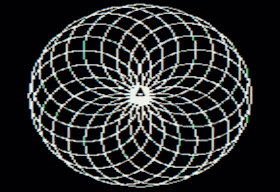
LOGO is a programming language dating back to 1967, made with the specific purpose of teaching concepts like logic and iteration in a visual and interactive way. Famous for "Turtle Graphics," it shares a lot of DNA with things like SVG, CNC, and G-code. Typically the programmer describes a path to the "turtle", which then walks along the path, drawing a line behind it. The triangular looking icon in the middle is how Apple LOGO represents the turtle.
How it was made
Here is the code I used to create the image as seen above:
REPEAT 20 [REPEAT 360 [FD 1 RT 1] RT 18]
This command essentially creates 20 circles, rotating 18 degrees each time a circle is completed.
The image above was created using Apple's variant for their IIe computers. I'll need to redo the image in better quality, not to mention this text blurb, but I thought it was a too good an emblem for the main page to not at least get something up. This represents one of the classic spirograph patterns that people often make when playing around in LOGO.
Any odd colors you see in the image are normal artifacts from Apple's HIRES graphics mode, and are actually much less prominent than they should be due to the low quality of the image capture and compression. The turtle can be hidden or repositioned with a command. I chose to leave it in peace, where it finished, back where it began.
How to permute it
First, find yourself a parser. Here is a link to an online version I used to test my ideas: Logo Interpreter. A simple way to change the number of circles in the pattern is to change the 20 and the 18 such that they are factors of 360. For example 8*45=360:

REPEAT 8 [REPEAT 360 [FD 1 RT 1] RT 45]
There are a lot of ways you can reach 360; it is a highly composite number. How serendipitous. If you'd like to make the image more faceted, that would involve the middle bit, which governs the curvature of the circle itself.
This makes an interesting shape sure to remind you of Escher:
REPEAT 8 [REPEAT 8 [FD 45 RT 45] RT 45]
This simply demonstrates that we don't need to stick to integers:
REPEAT 16 [REPEAT 16 [FD 22.5 RT 22.5] RT 22.5]
I noticed that matching the number of circles with the number of line segments and then matching the offset of each circle with the offset and length of each line segment creates perfectly faceted images. This should not have surprised me. But I was surprised.
LOGO isn't particularly used in contemporary design, but if you were to use it and make something you like, you'll be happy to know it is easy to bring that pattern into the modern world. It is very translatable into other formats. Below is an SVG interpretation of the original image I made.
Mind you, this is is just scratching the surface. More literally than you realize, logo was created with the mentality "Low floor, high ceiling." LOGO is a fully Turing complete language. LOGO can almost certainly run Doom. But for now, let's just try refactoring one line of code, written by a child.
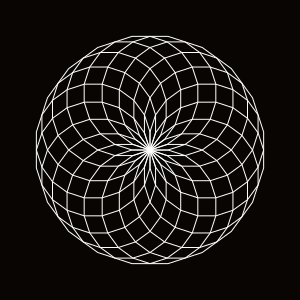
REPEAT 20 [REPEAT 20 [FD 18 RT 18] RT 18]